Monitoring thermal chamber temperature directly from in-house C# and .NET software

Temperature monitoring in automotive test cells
Vehicle telematics device manufacturing
Who is this use case for?
Automotive and telematics test engineers who need to capture temperature from a test chamber in their own C#, Python, or LabVIEW software, without building inside a closed DAQ system or buying its dedicated acquisition cards.
What is this about?
Integration of a Dracal USB temperature sensor into a custom C# and .NET application to monitor an automotive test chamber, capturing chamber temperature alongside the team’s primary test data. It removed the need for a closed DAQ system, which reaches the sensor only through its own dedicated acquisition hardware and software layer.
Customer Story
Feedback from an engineer responsible for test-chamber instrumentation at a manufacturer of vehicle telematics and fleet-tracking hardware.
″We built our own logging software for our test setup. It runs on Windows, in C# and .NET, and we needed to monitor temperature in a thermal chamber, so we went looking for a USB temperature sensor we could bring into that system.
A lot of the other sensors we looked at require proprietary software, and that puts a barrier in front of getting the data into our own systems. National Instruments, for example, have a lot of sensors, but you need their proprietary software for input and output, and you need their own input and output card. That makes it very long and complicated to integrate.
With Dracal it was just ease of use. It was very easy to connect, and it let us automate the process easily. We could bring the readings straight into our own logging software instead of working through someone else’s tools.
To quantify it, we were up and running in a couple of minutes, while any other solution available on the market would have taken several hours. It has been working very well.
Today we use it to monitor the thermal chamber, and it does that job well.″
The challenge
This customer needed to monitor temperature inside a thermal chamber and capture it in an in-house logging application built in C# and .NET on Windows. The integration could not sit inside a closed DAQ system with its own dedicated acquisition hardware and software, had to route data into the team’s own system, and had to be quick to stand up.
The solution
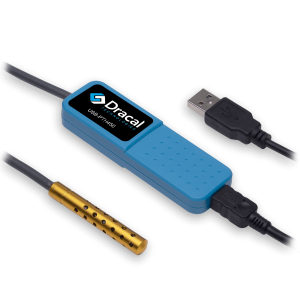
The Dracal USB temperature sensor connects over USB, and the customer’s own C# and .NET application reads them directly, with no dedicated acquisition card and no vendor software layer to operate within. The data lands in the team’s own system rather than a closed ecosystem, and temperature was reading correctly within a couple of minutes, against the several hours a card-based alternative would have required.
Sensors used for this project:
Prerequisites and limitations
To implement this solution, the following prerequisites and limitations are considered:
- A host running a custom application.
- Host-side integration: The sensor is read over a standard USB connection from the host’s own software, so no dedicated acquisition card and no vendor DAQ software layer are required. The sensor can be read over a standard serial (VCP) interface with no Dracal software installed, or through Dracal’s command-line tool, REST JSON API, and code examples in C#, Python, and LabVIEW. Those tools are Dracal software, provided free and without licence fees or usage restrictions. Verify which integration tool suits your application better.
- Measurement scope: This deployment measures temperature.
- Data capture: Chamber readings are captured without manual entry and, where needed, timestamped to align with the primary test data. The integrator handles this in the host application.
- Operating range: Confirm that the model’s rated operating range covers the chamber setpoints before deployment. Here is a Dracal temperature sensor comparison guide.
Implementation
- Confirm the exact Dracal USB temperature sensor model and order it from the product page.
- Connect the sensor over USB to the host. Drivers are available for Windows, Linux, and macOS.
- Read the sensor from the host application (code examples for C#, Python, or LabVIEW) using the free command-line tool, Virtual COM (serial) communication, or the REST JSON API.
- Place the sensor in the thermal chamber and confirm a correct temperature reading.
- Automate capture inside the test software so readings are logged during the test cycle, without manual entry.
State after implementation
The Dracal USB temperature sensor now monitors the customer’s thermal chamber, and the readings feed directly into the in-house software built in C# and .NET on Windows. No dedicated acquisition card or vendor DAQ software sits between the sensor and the application, so the team records chamber temperature inside its own system rather than a closed ecosystem. The integration that a card-based alternative would have taken several hours to stand up was running in a couple of minutes, and it has been working well since.
PRODUCTS YOU CAN TRUST
Approved by engineers, scientists and researchers around the world.
Thousands of companies trust our products worldwide:












Not sure if your project will benefit from Dracal’s solution?
Contact us, tell us about your project, and we’ll quickly determine if there’s a fit.
"*" indicates required fields