Gathering real-time meteorological conditions across large indoor test facilities over Ethernet
OEM integration into custom monitoring software
Aerospace and defense
Who is this use case for?
Teams that operate large indoor test facilities and need to feed real-time environmental conditions into their own Windows software. It fits situations where several sensors are spread across a wide indoor space, a network path to a control PC already exists, and the measurement data must be pulled programmatically rather than read from a separate packaged application.
What is this about?
Integration of Dracal USB weather stations and SensGate gateways into a custom Visual Studio C# application. The goal was to gather real-time meteorological conditions across a large indoor test facility. The SensGate carries the instruments over Ethernet to a Windows PC. The custom software retrieves the measurements through dracal-sensgate-get API calls. Temperature, relative humidity, and atmospheric pressure are read from instruments distributed along the facility.
Customer Story
Feedback from the engineer responsible for integrating this hardware at an aerospace and defense end-customer.
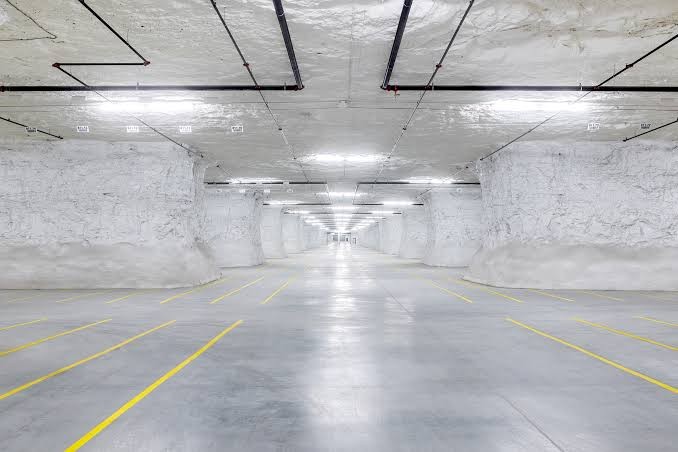
″We required a system that could communicate over Ethernet to a Windows-based PC and could be operated via custom software. We have multiple weather stations along the length of two different indoor facilities, and we wanted to quickly gather real-time meteorological conditions within these spaces.
We are not aware of another viable option to accomplish this.
The SensGates that we purchased are used as interfaces between our custom Visual Studio C# software and your USB weather stations.
We used the SensGateGet API calls to retrieve data from the weather stations.″
The challenge
This customer needed to gather real-time meteorological conditions within large indoor test facilities and feed them into a custom Visual Studio C# application. The hard constraints: communication over Ethernet to a Windows-based PC, operation through custom software rather than a packaged application, and multiple sensors distributed along the length of the space.
The solution
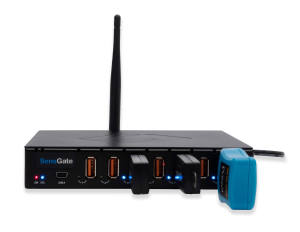
Dracal SensGate gateways connect the USB weather stations (Dracal sensors) and expose them over Ethernet, so the instruments reach the Windows PC as if they were locally attached. The custom C# software then retrieves temperature, relative humidity, and atmospheric pressure through dracal-sensgate-get API calls, which meets the requirement to operate through custom software. Multiple SensGates cover the sensors distributed along the length of each facility.
Sensors used for this project:
Prerequisites and limitations
To implement this solution, the following prerequisites and limitations are considered:
- A Windows host PC running the integrator’s own software. In this integration the customer used a Windows-based PC with a custom Visual Studio C# application; the SensGate presents the connected instruments to that host over the network.
- An Ethernet or Wi-Fi network path between each SensGate and the host PC. The SensGate communicates instrument data over the network, so the host must be reachable on the same network. See the SensGate getting-started guide.
- One SensGate per group of instruments. Each SensGate accepts up to seven USB instruments directly; additional instruments require a USB hub.
- The dracal-sensgate-get command-line tool, packaged with DracalView, or the SensGate REST API (VCP products only) for programmatic data retrieval. C# code samples are available for integration.
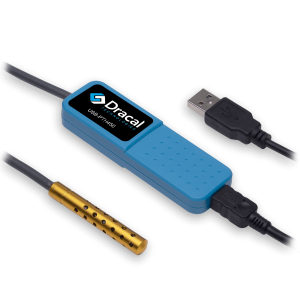
- The USB weather station is a single multi-measurand instrument reporting temperature, relative humidity, and atmospheric pressure. The sensors do not store data on the instrument itself; the SensGate provides local logging if buffering is required.
Implementation
- Order the SensGate gateway or gateways and the USB weather station or stations (Dracal sensors) required for the facility.
- Connect each USB weather station to a SensGate USB port, using a USB hub when more than seven instruments share one gateway.
- Place the SensGates along the space and connect them to the Windows host over Ethernet, confirming the instruments appear on the network.
- Retrieve real-time data from the custom Visual Studio C# application through dracal-sensgate-get CLI or REST API calls.
- Validate that temperature, relative humidity, and atmospheric pressure read correctly for each sensor within the facility.
- Run the retrieval continuously as the meteorological feed for the monitoring application.
State after implementation
Dracal SensGate gateways now sit along the large indoor test facility, each carrying the USB weather stations connected to it and presenting them to the Windows host over Ethernet. The custom Visual Studio C# software pulls temperature, relative humidity, and atmospheric pressure in real time through dracal-sensgate-get API calls, so operators read current meteorological conditions inside the facility directly from their own application. The instruments are distributed along the length of the space, and data retrieval runs as a routine part of the customer’s monitoring.
PRODUCTS YOU CAN TRUST
Recognized by engineers in the aerospace and defense sectors worldwide.
Thousands of companies trust our products worldwide:






Not sure if your project will benefit from Dracal’s solution?
Contact us, tell us about your project, and we’ll quickly determine if there’s a fit.
"*" indicates required fields