Documentation of the VCP (Virtual COM Port) option
Dracal instruments carrying the “VCP-” prefix can communicate as a virtual COM port, giving you direct serial access to their measurements from virtually any operating system or programming environment. This guide walks you through setting up VCP mode, reading the data format it produces, and using the available commands to control polling rate, output precision, etc.
[Last Update: 07/01/2026]
Major change
As of July 1, 2026, all VCP products are shipped in VCP mode. It is therefore no longer necessary to change the communication mode, except for DracalView users running Windows.
- 1. Introduction
- 2. Prerequesites
- 3. VCP products and DracalView
- 4. VCP mode: Requirements and data
- 5. Available commands in VCP mode
1. Introduction
Dracal sensors with the ability to communicate as virtual COM ports are identifiable by the prefix “VCP-” present in their product code. Upon delivery, you will receive your VCP products in VCP mode, ready to integrate in your program or software. In this documentation you will find information about the format of the generated data as well as the commands available in VCP mode.
For DracalView users running Windows, you will find here information about the conversion between VCP and USB communication modes.
This documentation is intended for users who have the knowledge to manipulate the data generated by virtual COM port autonomously. For less experienced users, a getting-started guide has been designed specifically for you.
2. Prerequesites
Have skimmed the Getting Started with VCP mode guide
3. VCP products and DracalView
Under Linux and Mac OS, Dracal’s VCP products that are in VCP mode behave exactly like any classical Dracal USB sensor. Their data can be accessed via our command line tool dracal-usb-get or our free data logging and visualization software DracalView.
However, users working under Windows will need to switch from VCP to USB mode to access Dracal tools. You will find here the steps to perform this change.
4. VCP mode: Requirements and data
4.1. Setting up your working tool
In order to allow sending commands to your Dracal device now in VCP mode, it is necessary to disable the echo of your data access tool, whatever it is (Linux terminal, Putty, etc.)
Also, we remind Linux users of the importance of having the necessary access rights to access the data. For more information, see point 5) of the documentation for Linux users.
4.2. Available data
Only the data from the real channels of your sensors are communicated by VCP protocol. Recall that a real channel is a channel whose data come directly from the reading of a physical quantity (temperature, relative humidity, pressure, concentration, etc.) while a virtual channel is one whose data are calculated from the real channels (humidex, altitude, etc.) To find out the nature (real or virtual) of the existing channels for your product, consult the “Available channels” section of the Specifications tab in its product sheet.
4.3. Data format
The format of the data generated in VCP mode by Dracal products is as follows (without the spacing):
where
- LINE_TYPE : The type of the line. The possible options are:
D: Data lineI: Information lineC: Calibrated data (for VCP products supporting Dracal calibration)
- PRODUCT : Product number (e.g.
VCP-PTH200) - SERIAL : Unique serial number of the product (e.g.
E16026) - MESSAGE : Echo message when a command is sent to the device (ex.
Poll interval set to 1000 ms) - (D1,U1),(D2,U2),…,(Dn,Un) : Readings in pairs (numerical value, unit) (e.g.
100676,Pa,23.8945,C.21.7853,%) - CHECKSUM : *[4-character hexa code calculated with CRC-16/XMODEM function] (e.g.
*A13D)
The CRC algorithm is CRC-16-CCITT (XMODEM) and it is calculated for each line from the first character of the line up until the asterisk ‘*‘ exclusively, meaning the asterisk itself is not included. There is always exactly one asterisk per line, followed by the CRC expressed in 4 hexadecimal digits, followed by carriage return ‘r‘ and newline ‘n‘ . None of these characters are included in CRC computation.
Here is an excerpt of our VCP-PTH200 readings:
D,VCP-PTH200,E16026,,100681,Pa,*040A
%,D,VCP-PTH200,E16026,,100680,Pa,23.9239,C,23.154,%,*CC78
D,VCP-PTH200,E16026,,100680,Pa,23.9532,C,23.1098,%,*aa99
D,VCP-PTH200,E16026,,100684,Pa,23.9666,C,23.035,%,*723f
D,VCP-PTH200,E16026,,100680,Pa,23.9666,C,22.9892,%,*9758
D,VCP-PTH200,E16026,,100681,Pa,23.9666,C,22.9587,%,*8abb
D,VCP-PTH200,E16026,,100680,Pa,23.9372,C,23.0625,%,*1169
D,VCP-PTH200,E16026,,100681,Pa,23.9532,C,23.1098,%,*ef2d
D,VCP-PTH200,E16026,,100683,Pa,23.9532,C,22.9725,%,*01f3
Note: Remark that the first two reading lines may be incomplete or inconsistent. This is normal as it is very unlikely that the beginning of the user’s data reading is exactly synchronized with the beginning of a communicated data line.
5. Available commands in VCP mode
5.1. Get information about columns: INFO command
The command INFO displays the description of the different data columns, which are specific to each sensor. This command allows, among other things, users who want to record data in a .csv file to get the header of their columns. Here is the result of the call of this command for our VCP-PTH200:
D,VCP-PTH200,E16026,,100724,Pa,22.2816,C,22.5376,%,*aa91
D,VCP-PTH200,E16026,,100724,Pa,22.3243,C,22.4674,%,*4e1d
D,VCP-PTH200,E16026,,100724,Pa,22.3083,C,22.3728,%,*8202
I,Product ID,Serial Number,Message,MS5611 Pressure,Pa,SHT31 Temperature,C,SHT31 Relative Humidity,%,*bbdd (Invoking command: INFO)
D,VCP-PTH200,E16026,,100725,Pa,22.3243,C,22.3301,%,*8a7d
D,VCP-PTH200,E16026,,100724,Pa,22.3377,C,22.3484,%,*0f44
D,VCP-PTH200,E16026,,100723,Pa,22.351,C,22.3026,%,*97d4
As the terminal is configured without echo, the invocation of the command INFO does not appear in the terminal while the result is present. Note, on the line corresponding to the result of the command, that the first character displayed is I, reminding that the line is not a data line, but an information line.
5.2. Set the data polling rate: POLL command
The command POLL n, n ≥ 0, is invoked to set to n (in ms) the data polling rate. Here is an illustration of the feedback displayed after the invocation of the command POLL 2000 (poll data every 2000 ms):
D,VCP-PTH200,E16026,,100696,Pa,23.3845,C,20.2197,%,*78df
D,VCP-PTH200,E16026,,100700,Pa,23.3711,C,20.3082,%,*25c8
D,VCP-PTH200,E16026,,100698,Pa,23.4005,C,20.3845,%,*3cac
D,VCP-PTH200,E16026,,100698,Pa,23.4005,C,20.4593,%,*6d48
I,VCP-PTH200,E16026,Poll interval set to 2000 ms,,,,,,,*b754 (Invoking command: POLL 2000)
D,VCP-PTH200,E16026,,100699,Pa,23.3845,C,20.5051,%,*4d46
D,VCP-PTH200,E16026,,100698,Pa,23.3711,C,20.4303,%,*01db
If we try to force a frequency of 5 ms (command POLL 5), which would be much faster than the internal 100 ms limit frequency of the sensor, the latter will be applied, as shown in the following example:
D,VCP-PTH200,E16026,,100682,Pa,23.769,C,19.9542,%,*f0d0
D,VCP-PTH200,E16026,,100682,Pa,23.769,C,20.1053,%,*8f8a
I,VCP-PTH200,E16026,Specified interval is below minimum,,,,,,,*3bd8      (Invoking command: POLL 5)
I,VCP-PTH200,E16026,Poll interval set to 100 ms,,,,,,,*6cef
D,VCP-PTH200,E16026,,100681,Pa,23.769,C,20.2121,%,*c111
D,VCP-PTH200,E16026,,100683,Pa,23.769,C,20.2121,%,*af17
D,VCP-PTH200,E16026,,100683,Pa,23.769,C,20.2121,%,*af17
D,VCP-PTH200,E16026,,100683,Pa,23.769,C,20.2884,%,*1d1e
Similarly, if we try to force a frequency (e.g. POLL 100000) that is slower than the 60000 ms limit frequency, the latter will be applied, as shown in the following example:
D,VCP-PTH200,E16026,,100696,Pa,23.3845,C,20.2197,%,*78df
D,VCP-PTH200,E16026,,100700,Pa,23.3711,C,20.3082,%,*25c8
D,VCP-PTH200,E16026,,100698,Pa,23.4005,C,20.3845,%,*3cac
I,VCP-PTH200,E16026,Specified interval is above maximum,,,,,,,*82c7 (Invoking command: POLL 100000)
I,VCP-PTH200,E16026,Poll interval set to 60000 ms,,,,,,,*6053
D,VCP-PTH200,E16026,,100681,Pa,23.769,C,20.2121,%,*c111
D,VCP-PTH200,E16026,,100683,Pa,23.769,C,20.2121,%,*af17
D,VCP-PTH200,E16026,,100681,Pa,23.769,C,20.2121,%,*c111
Finally, the command POLL 0 stops data polling, until a new command POLL n, n>0, is called again:
D,VCP-PTH200,E16026,,100681,Pa,23.769,C,20.2121,%,*c111
D,VCP-PTH200,E16026,,100683,Pa,23.769,C,20.2121,%,*af17
I,VCP-PTH200,E16026,Polling disabled,,,,,,,*3567                          (Appel de la commande: POLL 0)
5.3. Activate or deactivate the calibration: CAL command
Dracal sensors of the VCP-CAL type, i.e. having both the VCP option and the Dracal 3-point user-calibration mechanism, have access to the CAL command. This command allows to activate or deactivate the application of the calibration for the points previously entered by the user. By default, the calibration mechanism is in active mode (CAL ON) and the data returned by the instrument is calibrated. To deactivate the calibration mechanism, simply invoke the CAL OFF command as shown below. In this example, a calibration point has been entered into the DracalView software for a VCP-PTH450-CAL instrument. The point entered applies an offset of +5 °C to the instrument’s temperature channel:
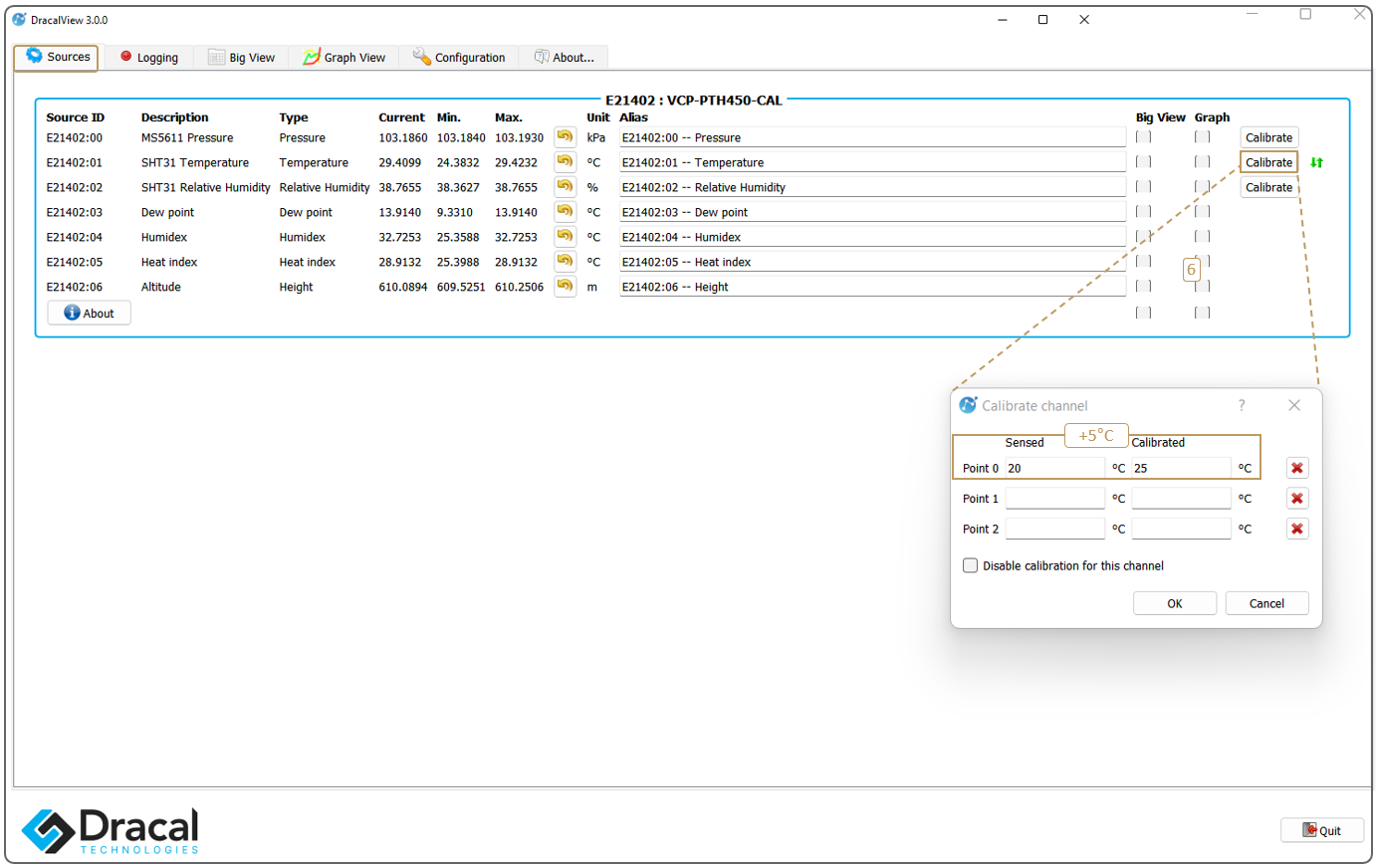
Let’s see the effect of invoking the CAL OFF and CAL ON commands on the returned data:
C,VCP-PTH450-CAL,E21402,,103183,Pa,29.41,C,38.46,%,*d0ea
C,VCP-PTH450-CAL,E21402,,103183,Pa,29.40,C,38.46,%,*d39f
C,VCP-PTH450-CAL,E21402,,103182,Pa,29.41,C,38.48,%,*a746
I,VCP-PTH450-CAL,E21402,Calibration OFF,,,,,,,*6819       (Invoking command: CAL OFF)
D,VCP-PTH450-CAL,E21402,,103183,Pa,24.40,C,38.43,%,*b0a9
D,VCP-PTH450-CAL,E21402,,103183,Pa,24.41,C,38.49,%,*db77
D,VCP-PTH450-CAL,E21402,,103182,Pa,24.42,C,38.42,%,*1501
D,VCP-PTH450-CAL,E21402,,103184,Pa,24.41,C,38.46,%,*0619
I,VCP-PTH450-CAL,E21402,Calibration ON,,,,,,,*6819        (Invoking command: CAL ON)
C,VCP-PTH450-CAL,E21402,,103181,Pa,29.41,C,38.35,%,*972f
C,VCP-PTH450-CAL,E21402,,103181,Pa,29.41,C,38.34,%,*e19b
C,VCP-PTH450-CAL,E21402,,103181,Pa,29.40,C,38.31,%,*5eab
As expected, we can see that the temperature measurements in CAL ON mode, in orange, are indeed +5°C higher than the temperature data in CAL OFF mode, in green.
Note also the first element of the data lines, which indicate by the character C if the returned data are calibrated, and by the character D if they are not. In particular, a device in CAL ON mode for which no calibration point is entered will be identified by the letter D, as its data is effectively not calibrated.
5.4. Determine the number of decimal places to display: FRAC command
Sensors with both the VCP and CAL options are equipped with the FRAC command, which allows to choose the number of decimals to be displayed in VCP mode. The FRAC command can take integers from 0 to 7.
Entering 0 sets the decimal places to up to 6 significant digits.
Entering an integer greater than 7 is reduced to the upper limit of 7 decimal places.
Here is an illustration of the invocation of the FRAC command:
D,VCP-PTH450-CAL,E21402,,103180,Pa,24.3965050,C,38.4328960,%,*573b
D,VCP-PTH450-CAL,E21402,,103178,Pa,24.3965050,C,38.3489720,%,*9f9f
D,VCP-PTH450-CAL,E21402,,103179,Pa,24.4098570,C,38.3504980,%,*2e50
D,VCP-PTH450-CAL,E21402,,103178,Pa,24.3965050,C,38.3627050,%,*5599
I,VCP-PTH450-CAL,E21402,Printing 4 fractional digits,,,,,,,*70f1        (Invoking command: FRAC 4)
D,VCP-PTH450-CAL,E21402,,103180,Pa,24.4099,C,38.3780,%,*2af4
D,VCP-PTH450-CAL,E21402,,103181,Pa,24.3965,C,38.4192,%,*3ecf
D,VCP-PTH450-CAL,E21402,,103180,Pa,24.3832,C,38.3490,%,*213a
I,VCP-PTH450-CAL,E21402,Printing 2 fractional digits,,,,,,,*a9d4        (Invoking command: FRAC 2)
D,VCP-PTH450-CAL,E21402,,103183,Pa,24.40,C,38.42,%,*c61d
D,VCP-PTH450-CAL,E21402,,103181,Pa,24.38,C,38.43,%,*dac4
D,VCP-PTH450-CAL,E21402,,103179,Pa,24.41,C,38.42,%,*fe59